Guides · United Kingdom · recruiters, HR & hiring managers
Draft text first — why paste beats a live URL
VacancyCheck is built around paste-first wording checks. Checking a live URL after publish is useful for cleanup — but the cheaper fix is before the ad is public. Not legal advice. Not Equality Act clearance.
Free limited check · £9.99 full PDF · £79.99/mo (up to 20)
The cost of checking after publish
Once an ad is live, candidates may already have applied, shared the link, or cached the text on job boards. Edits still help, but you are cleaning up in public. A pre-publish paste keeps the check private until you decide the draft is ready.
Paste is the primary input
Copy the vacancy body from your ATS, Google Doc, or email thread into the free check. You do not need a public URL. Magic-link email verification unlocks one limited on-screen check per rolling week; upgrade when you want the full wording risk report PDF.
When a live URL still helps
Use a live URL only for ads that are already published — for example, a board listing you inherited, or a campaign that went out before a final wording pass. Treat URL mode as retrospective. Re-paste the corrected text when you rewrite.
A simple workflow
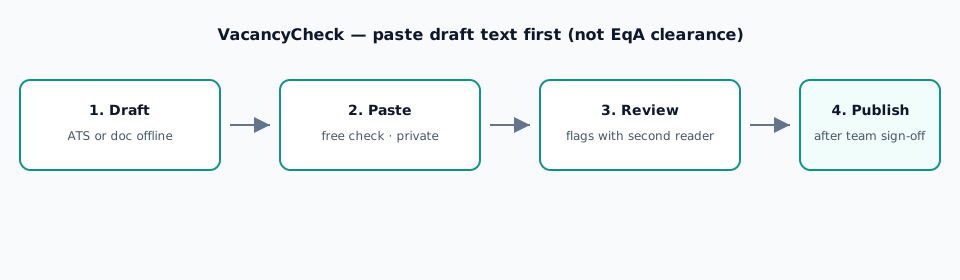
- Draft the ad offline with your checklist (pre-publish checklist).
- Paste into VacancyCheck and review flags with a second reader.
- Edit the source draft — not only the board field.
- Publish once the team signs off. Archive the final text.
What you get back
An informational wording risk report: patterns and good-practice notes to discuss. Free shows a limited on-screen set. £9.99 returns the full PDF for one vacancy. £79.99/mo covers up to 20 full reports. None of these are Equality Act clearance or legal advice.
Keep in mind
- Paste draft text first; live URL is optional and retrospective.
- Not legal advice. Not Equality Act clearance.
Related guides
Paste draft text — free check All guides
Not legal advice. Not Equality Act clearance. Informational wording hygiene only.